20 Oz Tumbler Canva Mockup: Your Drag & Drop Design Solution
Why Your Product Photos Are Costing You Sales
You've spent hours perfecting your tumbler design. The colors are right, the typography pops, and the artwork feels cohesive. But when you upload that flat PNG to your online store, something feels off. Customers scroll past. The design doesn't translate the way you imagined. That gap between your vision and the final product listing is where most small business owners lose momentum.
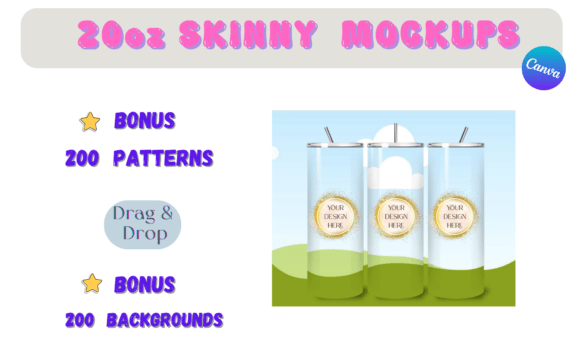
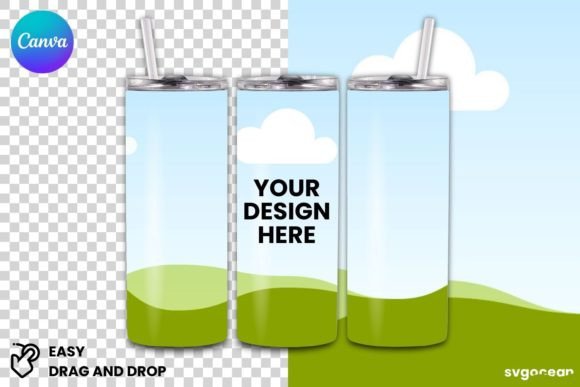
The 20 Oz Tumbler Canva Mockup solves this problem without requiring Photoshop skills, expensive photography equipment, or hours of frustration. It's a Canva template designed specifically for entrepreneurs, designers, and creators who want professional product imagery without the professional price tag. You receive one Canva template that includes premium content, giving you access to polished mockup scenes that make your designs look ready for a shelf display.
Think about the last time you bought something online. Chances are, the product photo played a massive role in your decision. Customers want to visualize how a tumbler looks in real life—held in a hand, sitting on a desk, or nestled in a car cup holder. A flat design file doesn't communicate scale, texture, or context. The 20 Oz Tumbler Canva Mockup bridges that visual gap instantly.
What Makes This Mockup Template Different
Most mockup tools require intermediate design skills. You download a PSD file, open Photoshop, navigate smart objects, adjust layers, and hope the final render looks realistic. For someone running an Etsy shop, managing social media, or launching a new product line, that workflow eats into time better spent on actual business growth.
This template strips away that complexity. Open it in Canva, drag your design onto the tumbler surface, and export. The included premium content means the backgrounds, lighting, and surface textures already look professional. You're not cobbling together stock images or wrestling with shadow effects. The mockup scene is pre-built for visual appeal.
The visual personality of these mockups leans modern and clean. They work well for brands that want to project confidence without clutter. Whether your tumbler designs feature bold graphic patterns, minimalist monograms, or vibrant floral illustrations, the mockup environment lets those designs breathe. The scenes feel aspirational but accessible—exactly the tone that converts browsers into buyers on platforms like Etsy, Shopify, and Amazon Handmade.
Where This Template Shines Across Your Projects
Small business owners use the 20 Oz Tumbler Canva Mockup for product listings, but the applications stretch further than most people expect. Social media graphics benefit enormously from mockup imagery. When you post a photo-realistic tumbler on Instagram or Pinterest, engagement rates climb because followers can picture themselves holding that product. A flat design graphic might get a like. A styled mockup image gets saved, shared, and clicked.
Brand identity work also pairs naturally with this template. If you're developing a visual brand for a tumbler business—logos, color palettes, packaging concepts—seeing those elements rendered on a realistic product surface helps you evaluate cohesion. Does the logo sit well on the curved surface? Do the colors maintain their vibrancy? Does the overall aesthetic match the target audience? These questions become easier to answer when you're looking at a mockup rather than a flat file.
Marketing materials benefit too. Email campaigns, website banners, and even printed catalogs need product photography that feels consistent. Using the same 20 Oz Tumbler Canva Mockup template across multiple listings creates visual uniformity. Customers recognize your brand faster when every product image shares the same lighting, angle, and background style. That consistency builds trust, and trust drives repeat purchases.
Practical Tips for Getting the Most From Your Mockup
Start with high-resolution design files. Even the best mockup template can't rescue a blurry or pixelated source image. Export your tumbler artwork at 300 DPI or higher before dragging it into the Canva template. This ensures the final product image looks crisp on both mobile screens and desktop monitors.
Pay attention to how your design wraps around the tumbler surface. Curved surfaces distort artwork differently than flat ones. If your design includes text, test whether the letterforms remain legible after the mockup applies its curvature effect. Script fonts and handwritten fonts sometimes lose clarity on curved surfaces, so you might need to increase font size or simplify letter spacing. Sans serif fonts and bold serif fonts tend to hold up better at smaller sizes on tumbler mockups.
Consider your background choices carefully. The mockup template includes premium scenes, but not every background suits every design. A neon-colored tumbler design might clash with a warm wood-grain surface. A minimalist black-and-white monogram might disappear against a dark marble countertop. Match the mockup environment to your design's personality. Bright, playful designs pair well with lighter, airy backgrounds. Sophisticated, moody designs look striking against darker, textured surfaces.
Think about your target platform when exporting. Etsy product images perform best as square or slightly vertical rectangles. Instagram favors square or vertical formats. Pinterest rewards tall, vertical images. You can resize and crop your mockup export within Canva to match each platform's preferred dimensions without losing quality. This small step maximizes how your product image displays across different feeds and search results.
Building a Professional Product Line With Limited Resources
One of the hardest parts of running a product-based business is maintaining professional standards on a startup budget. Hiring a product photographer costs hundreds per session. Learning advanced design software takes weeks. The 20 Oz Tumbler Canva Mockup template gives you a middle path—professional results without professional overhead.
The template includes Canva premium content, which means you're working with design assets that meet a higher visual standard than basic free resources. Premium backgrounds, textures, and elements elevate your final images in subtle but important ways. Customers might not consciously notice the difference between a premium mockup scene and a basic one, but they respond to quality on an instinctive level. Better images signal a better product, even before the customer reads your description or reviews.
For designers and content creators who work with clients, this template also streamlines your workflow. Instead of spending an hour staging a mockup for a client presentation, you can deliver polished product visuals in minutes. That efficiency lets you take on more projects, meet tighter deadlines, and focus your creative energy on the design work that actually matters.
Ultimately, the 20 Oz Tumbler Canva Mockup is a practical design asset that earns its place in your toolkit. It removes technical barriers, maintains visual quality, and adapts to multiple use cases across branding, marketing, and e-commerce. Whether you're launching your first tumbler shop or refining an established product line, having reliable mockup templates saves time, reduces stress, and helps your designs connect with the customers who will love them.