Custom Car License Plate Sublimation Template
There is something inherently nostalgic and personal about a license plate. It serves as a mobile identity, a badge of state pride, or a canvas for humor. For designers, print-on-demand sellers, and creative hobbyists, the ability to customize these plates opens up a massive market. Whether you are creating vanity plates for a wedding getaway car, designing custom signage for a garage, or crafting unique wall art, the foundation of your success lies in the precision of your template. This is where the Car License Plate Sublimation Template becomes an indispensable asset in your digital toolkit.
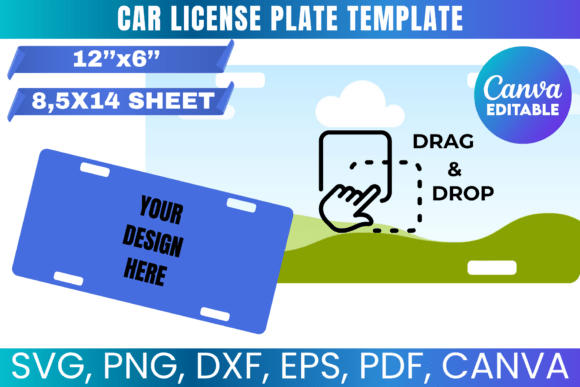
Unlike a simple image found via a search engine, a professional sublimation template is engineered for production. It is not just about the visual appeal; it is about the technical fit. This specific template is designed to fit a standard 8.5" x 14" sheet of paper, which is the legal size many sublimation printers handle well, or it can be scaled for larger format printers. The visual characteristic of this template is clean and precise. It respects the standard dimensions of a North American license plate (12" x 6"), ensuring that your final product looks authentic rather than "homemade." The personality of this asset is utilitarian yet versatile—it acts as a blank slate that allows your specific design style, whether it is vintage, minimalist, or chaotic, to take center stage without structural distortion.
Streamlining Your Workflow with Multi-Format Files
One of the biggest hurdles in digital crafting is file compatibility. You might design a beautiful layout in Adobe Illustrator, only to find that your cutting machine software rejects the file type. This Car License Plate Sublimation Template solves that problem by offering a comprehensive suite of formats: SVG, PNG, DXF, and PDF.
For those using Cricut or Silhouette machines, the SVG and DXF files are critical. They allow for vector scaling without loss of quality, meaning your lines remain sharp whether you are printing a standard plate or scaling up for a garage sign. The PNG file, featuring a transparent background, is perfect for layering in software like Photoshop or Canva. It allows you to easily drop in your background textures—be it brushed metal, weathered wood, or solid colors—without worrying about masking out the background manually. The inclusion of a Canva link is particularly helpful for entrepreneurs who prefer a drag-and-drop interface for rapid prototyping and social media mockups.
Practical Applications: From Wall Art to Branding
The versatility of a high-quality license plate design extends far beyond the car itself. Understanding where this template works best can significantly expand your product offerings.
- Home Decor and Wall Art: Vintage-style license plates are a staple in interior design, particularly in man caves, workshops, and eclectic living rooms. Using this template, you can create "plates" that display family names, important dates, or favorite quotes.
- Event Decor: For weddings or car-themed parties, custom plates serve as excellent props. You can print "Just Married" plates or table numbers styled like license tags.
- Small Business Branding: Auto shops, detailing services, and car washes can use this template to create branded merchandise or signage. It offers a cohesive way to present your business identity within the automotive niche.
- Personalized Gifts: The ability to customize text and imagery makes this ideal for creating one-of-a-kind gifts for car enthusiasts, new drivers, or retirees.
Designing for Impact: Readability and Visual Hierarchy
When working with a Car License Plate Sublimation Template, the constraints of the shape dictate your design choices. A license plate is a wide, rectangular canvas. This aspect ratio influences readability and visual hierarchy significantly.
Because the space is relatively small compared to a poster or banner, font choice is paramount. You are often working with display fonts or bold sans-serif typefaces that can be read at a distance or while moving. If you are layering text over a busy background image (like a sunset or a flag), you must ensure high contrast. A common mistake is using light-colored text on a mid-tone background, resulting in a muddy, unreadable final product.
Visual hierarchy on a license plate usually follows a specific pattern: a primary graphic or state name at the top, the main slogan or custom text in the center (largest and boldest), and a secondary text or registration sticker area at the bottom. While this template provides the blank canvas, respecting these visual weight distributions will make your designs feel intuitive and professional.
Technical Tips for a Flawless Finish
Using a digital template effectively requires a bit of technical know-how, especially regarding the printing and sublimation process. Here are some practical recommendations for getting the most out of this download:
- Color Management: Sublimation printers often interpret colors differently than standard inkjet printers. What looks red on your monitor might print pink on the substrate. It is highly recommended to run a "color correction" test strip on your specific paper and blank before running a full plate.
- Mirror Your Image: This is the golden rule of sublimation. Because you are printing onto transfer paper and heat-pressing it onto the plate, your final design must be mirrored horizontally. If you forget this step, your text will be backwards on the final product.
- Substrate Quality: The template is only as good as the blank you press it onto. Ensure you are using sublimation-ready aluminum blanks. Standard license plates from the DMV are coated to resist UV and weather; generic blanks may not have this coating, leading to fading over time.
- Cricut Users - Dimension Check: As noted in the product description, if you are using the SVG/DXF files to cut vinyl overlays (rather than sublimating the whole plate), ensure your software workspace matches the physical dimensions. If the imported file looks small, manually resize it using the width/height lock to 11.75" x 5.75" (the printable area of a standard plate).
Licensing and Commercial Use
For small business owners and entrepreneurs, understanding the license is just as important as the design itself. This Car License Plate Sublimation Template comes with a commercial use license for physical products. This means you are free to use the template to create finished goods—such as printed plates, wall art, or custom signs—and sell those items on platforms like Etsy, Amazon, or at local craft fairs.
However, the license strictly prohibits the redistribution of the digital files. You cannot resell the template itself, share it with friends, or offer it as a free download on your website. This protects the original creator's work and ensures that the market isn't flooded with identical free assets. By respecting these boundaries, you maintain a healthy creative ecosystem and protect your own business reputation.
In conclusion, this digital asset is more than just a shape; it is a gateway to a specific, highly sought-after niche in the customization market. Whether you are a seasoned graphic designer looking for precise vector files or a hobbyist wanting to make a gift for a friend, the combination of file formats and ease of use makes this a practical addition to any creative library. Unlock your creativity, load your sublimation printer, and start turning those blank templates into personalized works of art.