S25 Case Canva Template Bundle: Streamline Your Custom Case Designs
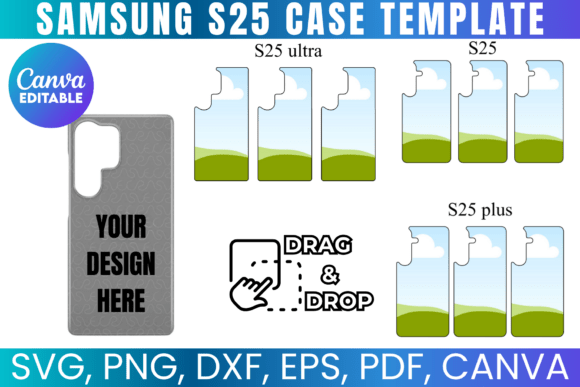
Creating professional, retail-ready phone cases shouldn't require hours of measuring, tracing, or wrestling with complex design software. The S25 Case Canva Template Bundle eliminates the guesswork entirely. This collection of precision templates gives designers, entrepreneurs, and hobbyists everything needed to produce custom Samsung Galaxy S25, S25 Plus, and S25 Ultra cases with confidence and speed.
Each template in this bundle is built to exact device specifications. The cut lines, camera cutouts, and button placements are all accounted for, so your finished designs align perfectly with the actual hardware. No more printing test sheets, trimming edges by hand, and hoping the fit works. These templates handle the technical side so you can focus purely on the creative work.
What's Inside the Bundle
The S25 Case Canva Template Bundle covers all three models in the Samsung Galaxy S25 series. Whether you're designing for the standard S25, the larger S25 Plus, or the flagship S25 Ultra, you'll find dedicated templates formatted and ready to go. Each template is sized to fit a standard 8.5" by 11" sheet of paper, which makes home printing and professional sublimation both straightforward options.
File variety is where this bundle really shines. You get SVG files that work seamlessly with Cricut and Silhouette machines, which is essential for anyone cutting vinyl decals or heat transfer material. The DXF format extends compatibility to Silhouette Studio's free version. PNG files with transparent backgrounds are included for layering designs in Photoshop, Illustrator, or any raster-based editor. PDF files with white backgrounds handle straightforward printing needs. And for those who prefer working directly in a browser, the Canva link lets you drag and drop graphics, text, and illustrations onto the template without installing anything.
Designing Without Barriers
One of the most practical aspects of this bundle is how it lowers the entry point for custom case creation. You don't need to own Illustrator or understand vector path editing to produce something polished. The Canva integration means anyone comfortable with basic drag-and-drop design can open a template, place their artwork, adjust positioning, and export a print-ready file in minutes.
This matters for small business owners running Etsy shops, side hustlers testing product ideas, and content creators wanting branded merchandise. The S25 Case Canva Template Bundle removes software barriers and lets you iterate quickly. Want to test five different colorways before committing to a production run? Open the template, swap your graphics, export, and compare. The workflow is fast enough to support real experimentation.
Sublimation and Print Compatibility
For sublimation printers, template accuracy is non-negotiable. A template that's even slightly off-spec means misaligned prints, wasted blanks, and frustrated customers. These templates are built with sublimation workflows in mind. The dimensions match standard sublimation paper sizes, and the design areas are clearly marked so you know exactly where artwork will appear on the finished case.
SVG and PNG formats also support direct-to-film printing, UV printing, and traditional screen printing setups. If you're working with a print-on-demand service, you can send these files directly without needing to explain your template specifications. The formats are industry-standard, which keeps communication with vendors clean and error-free.
Practical Use Cases Across Industries
Graphic designers can use the S25 Case Canva Template Bundle to offer phone case design as a service. Instead of charging clients for custom template creation on top of the design work, you start with a ready-made foundation. The time saved translates directly into better margins or faster turnaround.
Marketers and brand strategists will find value in creating branded phone cases for events, giveaways, or team merchandise. A consistent visual identity applied to physical products reinforces brand recognition in ways digital assets alone cannot. When someone carries a phone case with your logo and color palette, that's passive brand exposure every single day.
Bloggers, publishers, and content creators building personal brands can design limited-run cases featuring their artwork, catchphrases, or signature styles. It's a tangible product extension that audiences genuinely appreciate. The Canva link makes this especially accessible for creators who identify more as writers or photographers than graphic designers.
Crafters and hobbyists benefit from the multi-format approach. If you own a Cricut or Silhouette cutting machine, the SVG and DXF files let you cut vinyl wraps, decals, or heat transfer designs with precision. The templates serve as cutting guides that ensure every piece fits the intended device model correctly.
Working With Multiple File Formats
Having access to SVG, PNG, DXF, PDF, and Canva formats in one bundle means you're never locked into a single workflow. Start a design in Canva for speed, then move to Illustrator for fine-tuning vector elements. Export a PNG for your print vendor and an SVG for your cutting machine. The flexibility accommodates how real creative work actually happens, which rarely follows a single linear path.
The transparent PNG files are particularly useful for mockup creation. Drop the template into your preferred mockup generator or social media graphics tool to show clients or customers what the finished case will look like before production begins. This kind of visual presentation builds trust and helps close sales.
Instant Access and Lifetime Value
This is a digital product, which means you receive access to every file immediately after purchase. There's no shipping delay, no physical inventory to manage, and no risk of damaged deliveries. You download the files once and they're yours permanently. The one-time payment model means no subscriptions, no recurring fees, and no surprise charges down the road.
For anyone building a phone case business or simply exploring custom case creation as a creative outlet, the S25 Case Canva Template Bundle provides a solid, reliable foundation. The templates are accurate, the file formats cover every major design platform, and the Canva integration keeps the barrier to entry remarkably low. It's a practical design asset that earns its place in any creator's toolkit.