Canva Template Notebook Cover PLR: A Smart Solution for Creators
Starting a creative business or launching a new product line often hits a wall: the design phase. You have the idea, the plan, and the drive, but creating a polished, professional notebook cover from scratch requires time and design skills you might not have. This is where the Canva Template Notebook Cover PLR enters the picture, offering a practical shortcut that doesn't sacrifice quality or uniqueness. It's a set of pre-designed, fully editable templates specifically crafted for notebook and journal fronts, designed to get you from concept to finished product efficiently.
Beyond Generic: The Visual Appeal of These Templates
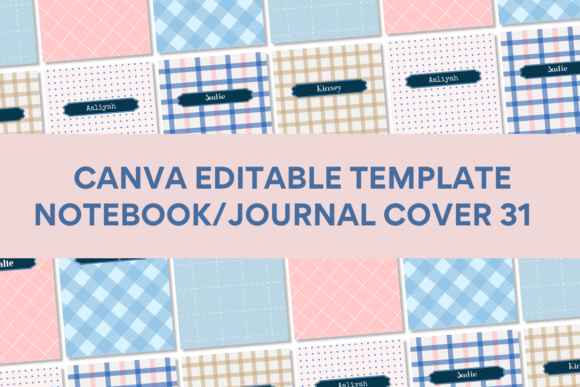
Forget the notion of generic, overused designs. A key strength of this particular Canva Template Notebook Cover PLR collection is its curated aesthetic. The illustrations, design elements, photos, and backgrounds are largely sourced outside of Canva's default library. This results in a distinct visual personality—think modern, clean lines paired with thoughtful artistic elements that feel intentional and cohesive. The style strikes a balance between contemporary minimalism and subtle decorative charm, making it versatile enough for a wide audience. It’s not trying to be everything to everyone; instead, it offers a solid foundation of professional design that you can then infuse with your own brand's voice.
The overall appeal lies in its adaptability. The templates provide a strong structural and aesthetic starting point, but they are not rigid. The color palette, typography, and imagery are all customizable within Canva's intuitive interface. This means the same template can be transformed to suit a wellness journal for yoga practitioners, a productivity planner for entrepreneurs, or a sketchbook cover for artists. The design supports the content rather than overwhelming it, a crucial consideration for any editorial design or packaging design project.
Practical Applications: Where These Templates Shine
The true value of any design asset is measured by its utility. For the Canva Template Notebook Cover PLR, the use cases are extensive. For small business owners in the print-on-demand space, these templates are a direct path to creating sellable products. You can quickly generate multiple cover variations to test market response without a significant upfront investment in custom design. Content creators and bloggers can use them to design branded workbooks, lead magnets, or subscriber gifts that look professionally produced, enhancing their brand identity and perceived value.
Beyond commerce, the applications are just as rich. Hobbyists and crafters can design personalized journals for gifts or personal use. Marketers can create sleek internal documents or client notebooks. The templates are sized at 8 x 11 inches, a standard notebook dimension that translates seamlessly to both digital mockups and physical printing. The included PDF with direct template links and clear instructions removes the technical barrier, making this a genuinely accessible tool for beginners and seasoned pros alike.
Making It Work for You: A Practical Guide
Simply having a template isn't enough; knowing how to leverage it is key. Here’s a practical approach to integrating the Canva Template Notebook Cover PLR into your workflow.
Start with Your Brand, Not the Template. Before you open the file, have your brand assets ready: your logo, color hex codes, and preferred font pairing. This ensures the template adapts to your brand identity, not the other way around. The templates are designed with modern typography in mind, but you should swap the placeholder text for fonts that represent your voice—whether that's a friendly sans serif font for clarity or an elegant script font for a personal touch.
Evaluate Fit and Customize Thoughtfully. Look at the six included designs and ask which one aligns best with your project's personality. Is it the more illustrative style or the typographically driven one? Once chosen, customize it methodically. Change the background color to match your palette. Replace the placeholder text with your title and subtitle. Adjust the layout of any decorative elements to ensure they complement, not compete with, your text. Think about visual hierarchy—your title should be the clear focal point.
Consider the End Use. Will this be a digital product (like a printable PDF) or a physical printed notebook? For print, ensure high-contrast text for readability and consider how the design will look when wrapped around a book's spine and back cover. For digital, you have more freedom with intricate details. Always do a test print or view the design at 100% zoom on a screen to check for clarity and balance. The commercial license included with PLR (Private Label Rights) products typically allows you to sell end-products, but always verify the specific terms to ensure compliance for your intended use.
Ultimately, this Canva Template Notebook Cover PLR is more than just a set of pretty designs; it's a functional design asset that streamlines the creation process. It empowers you to produce professional-looking creative fonts and layouts for your notebooks and journals, freeing up your time and energy to focus on what you do best—whether that's running your business, creating content, or pursuing your personal projects. By approaching it as a flexible starting point rather than a finished product, you unlock its full potential to support your unique creative vision.