Master the 15oz Mug Template for Perfect DIY Sublimation
Why This 15oz Mug Template Changes the Sublimation Game
If you've ever struggled with getting your mug designs to line up perfectly on the wrap, you know the frustration. A slight misalignment can throw off an entire print, wasting both time and materials. That's exactly where a well-crafted 15oz Mug Template becomes indispensable. This particular template is sized specifically for 8.5"x11" sheets, which means you can print directly from your home printer or a standard print shop without needing oversized equipment. It's built for real-world use—whether you're running a small Etsy shop creating personalized gifts or you're a hobbyist who wants to make custom mugs for family events.
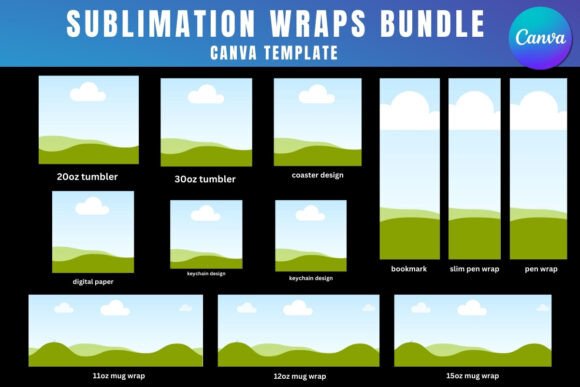
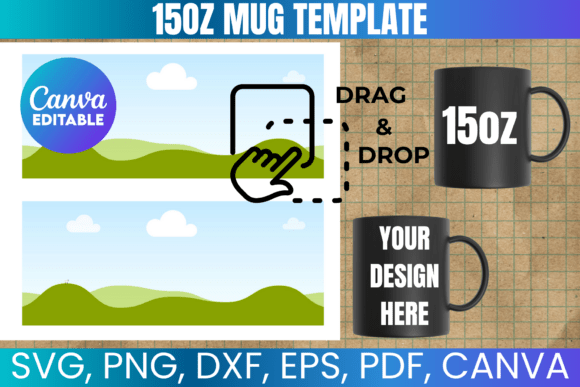
The visual layout of the template itself is clean and functional. The wrap area is clearly defined, giving you precise boundaries for your artwork, text, and design elements. There's no guesswork involved. You can see exactly where the handle cutout sits, how much bleed to account for, and where the design will wrap around the curve of the mug. This kind of clarity matters when you're working with sublimation, because heat transfer doesn't forgive sloppy margins. The Mug SVG Cut File included in the package ensures that whether you're using a Cricut, Silhouette, or another cutting machine, your physical cuts will match the digital template with minimal adjustment.
What's Inside the Package and Why Each File Matters
One of the most practical aspects of this 15oz Mug Template, Mug SVG Cut File bundle is the variety of file formats included. You get an SVG file for vector-based cutting machines, a PNG with a transparent background for layering in design software, a DXF file for Silhouette Studio users, and a PDF with a solid white background for straightforward printing. The Canva template link is a particularly smart inclusion—it lets you drag and drop your designs directly in a browser-based editor without needing expensive software. For someone just starting out with mug sublimation, this lowers the barrier significantly.
Each format serves a different workflow. The SVG file is ideal if you're using Cricut Design Space or Inkscape and need scalable vector graphics that won't lose quality at any size. The PNG file works beautifully when you're compositing multiple layers in Adobe Photoshop or CorelDraw. The DXF file bridges the gap for Silhouette Studio users who don't have the Designer Edition upgrade. And the PDF file gives you a reliable, print-ready option that works on virtually any device. Having all of these formats in a single download means you're not locked into one piece of software or one cutting machine—you can adapt the template to whatever tools you already own.
Real-World Applications for Designers and Small Business Owners
For entrepreneurs and content creators, this kind of design asset is more than a convenience—it's a productivity tool. Imagine you're a small business owner who sells custom mugs at local craft fairs or through an online store. Instead of spending hours measuring and resizing designs to fit a 15oz mug, you open the template, place your artwork, and print. The consistency this brings to your product line is noticeable. Customers receive mugs where the design wraps cleanly, the colors are vibrant, and the alignment is spot-on every single time. That kind of reliability builds a brand identity rooted in quality.
For designers working on packaging design or promotional merchandise, the template provides a professional foundation. You can test font pairings—maybe a bold sans serif font for headlines combined with a script font for decorative accents—directly within the template to see how they read on a curved surface. What looks great on a flat screen doesn't always translate to a cylindrical mug, and having a properly sized template lets you evaluate readability and visual hierarchy in context. This is the kind of practical testing that separates polished, professional work from amateur-looking products.
Tips for Getting the Most Out of Your Mug Template
A few practical recommendations can save you from common headaches. First, always do a test print on plain paper before committing to sublimation paper. Hold the printed sheet against your mug to verify the sizing and placement. Even though the 15oz Mug Template is designed to fit standard wraps, printer settings and paper sizes can introduce small variations. Second, if you're using Cricut Design Space, be prepared to manually adjust the sizing after importing the SVG file. Cricut sometimes scales files differently than intended, so double-check the dimensions against the template specifications before cutting.
Third, consider the commercial use terms carefully. This template is licensed for creating physical items—mugs, in this case—which means you can sell as many finished mugs as you'd like. What you cannot do is resell or redistribute the digital files themselves. This distinction matters if you're building a product line, because it protects your investment while giving you full creative freedom to use the template across unlimited projects. For small business owners and crafters, this kind of licensing clarity is essential.
Pairing Your Designs with the Right Software
The beauty of a versatile 15oz Mug Template is that it works across your entire creative toolkit. In Canva, you can quickly mock up designs using their drag-and-drop interface—perfect for brainstorming or for users who aren't comfortable with advanced design software. In Adobe Photoshop, you have full control over color correction, layer blending, and resolution settings, which is critical for achieving vibrant sublimation prints. In Inkscape or Cricut Design Space, the SVG format gives you clean, editable vector paths that scale without pixelation.
Each piece of software brings different strengths to the table, and the fact that this template includes files compatible with all of them means you can choose the right tool for each stage of your workflow. Sketch ideas in Canva, refine them in Photoshop, and cut your physical wraps with a Cricut or Silhouette machine. This kind of flexibility is what makes a premium design asset worth having in your collection—it doesn't just serve one purpose, it integrates into however you prefer to work.