Designing a Father's Day Gift with the Best Dad Ever Canva Template
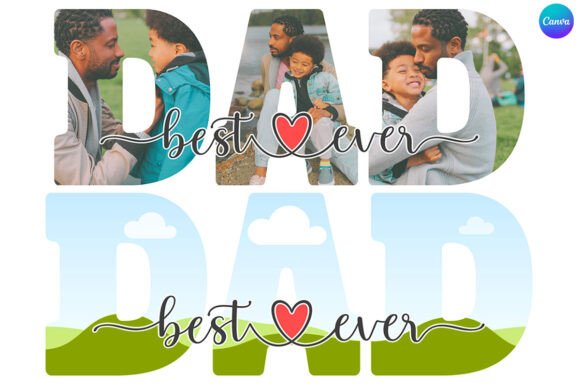
Finding the right visual element to celebrate a parent can be tricky. You want something that feels personal and high-quality, but you also need it to be practical to create. The Best Dad Ever Canva Photo Frame Template solves this problem by offering a pre-designed, editable layout that serves as a canvas for your own photos and messages. It isn't just a static image; it is a flexible design asset built specifically for the Canva ecosystem, allowing you to create a polished gift or marketing piece without needing advanced software skills.
This template functions as a digital wreath or border. It features transparent layers and a "Best Dad Ever" motif, typically arranged in a way that frames a central image. Because it is a Canva-native file, you receive a PDF link that directs you to the editor. Once open, the design is fully drag-and-drop. You can swap out photos, adjust colors, and resize the entire composition to fit anything from a social media post to a physical print. The visual style usually leans towards a mix of modern typography and decorative elements, making it versatile enough for both sentimental keepsakes and branded content.
Practical Applications: From Personal Keepsakes to Brand Marketing
While the obvious use case is a Father's Day card or a printable wall art piece for the home, the utility of the Best Dad Ever Canva Photo Frame Template extends well beyond personal gifting. For small business owners, marketers, and content creators, this template offers a ready-made solution for seasonal campaigns.
Imagine a coffee shop promoting a "Father's Day Brunch." Instead of hiring a designer for a one-off flyer, the manager can use this template to frame a photo of their signature latte or a candid shot of the staff. The "Best Dad Ever" text instantly connects the promotion to the holiday theme. Similarly, a blogger might use the frame to highlight a gift guide, placing product images inside the wreath to create a cohesive visual grid for Instagram or Pinterest. The key here is the template's role as a creative font and graphic hybrid—it provides the layout structure while leaving room for brand-specific customization.
Visual Style and Design Flexibility
The personality of this template strikes a balance between sentimental and professional. It avoids the overly cartoonish look of cheap clipart, opting instead for a style that feels more like a premium design asset. The floral or decorative wreath elements are usually vector-based, meaning they won't pixelate if you resize them for a large print. This scalability is crucial for anyone working on packaging design or large-format editorial layouts.
Furthermore, the template’s transparent layers are a significant advantage for vinyl sublimation. If you are a crafter producing mugs, t-shirts, or tote bags, you need the background to disappear so the design integrates seamlessly with the product fabric or surface. The Best Dad Ever Canva Photo Frame Template is built with this in mind, ensuring that the final output looks clean and professional on physical merchandise.
Integrating the Template into Your Design Workflow
Using this template effectively requires a basic understanding of visual hierarchy. The frame is designed to draw the eye inward, so the content you place inside needs to be high-resolution and well-composed. A blurry or poorly lit photo will undermine the quality of the frame. Treat the template as a professional showcase for your imagery.
When customizing the design, pay attention to the existing font pairings. Usually, these templates pair a bold, sans serif font for the main headline with a script font for accent words. If you choose to alter the text, try to maintain this contrast. A common mistake in DIY design is using too many similar fonts, which creates visual clutter. Stick to the established hierarchy unless you have a specific brand identity that requires a change.
Commercial Use and Brand Consistency
For entrepreneurs, the ability to maintain brand consistency is vital. While the template comes with its own color scheme, Canva allows you to input your specific hex codes. You can change the greenery to match your brand’s palette or alter the text color to fit your style guide. This adaptability transforms a generic holiday template into a cohesive part of your marketing strategy.
It is also worth noting the licensing aspect. Because this is a digital asset provided for use within Canva, it is generally intended for the end product you create with it. You cannot resell the template file itself. However, the designs you produce—whether they are social media graphics, flyers, or printed cards—are yours to use commercially. This makes it a cost-effective tool for agencies and freelancers who need to produce seasonal content for multiple clients without violating copyright restrictions.
Evaluating the Fit for Your Project
Before purchasing, consider the technical requirements. You need an active Canva account (free or Pro) to access the file. If you are working in a strictly offline environment or prefer Adobe Photoshop/Illustrator, this template will not be compatible. However, for the vast majority of modern content creators who rely on cloud-based tools, the workflow is seamless.
Think about the end format. If you are creating a digital asset, the resolution is less of a concern. But for print—especially for sublimation or high-quality photo prints—ensure your source image is 300 DPI. The template provides the frame, but the photo quality is up to you. The Best Dad Ever Canva Photo Frame Template is ultimately a vessel; its success depends on the content you pour into it.
In summary, this template serves as a bridge between amateur DIY and professional graphic design. It provides the structure, the aesthetic, and the technical setup (transparent layers, scalability) so you can focus on the message. Whether you are a daughter making a scrapbook page or a marketer designing a Facebook ad, it offers a practical, visually appealing solution that respects both your time and your creative vision. It proves that you don't need to be a design expert to create something that looks polished, personal, and ready for production.