Streamline Your Stationery: A7 Envelope Liner Templates
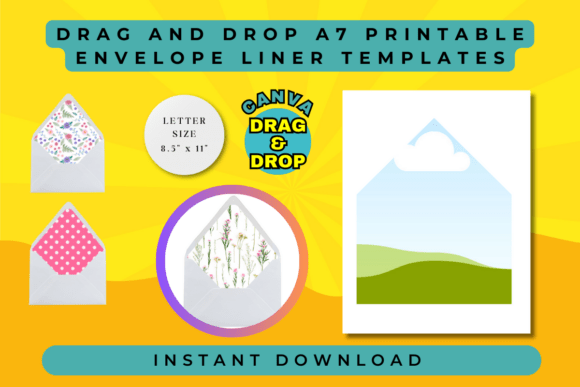
There is a specific kind of frustration that hits when you are trying to elevate a piece of mail. You have the perfect A7 envelope—usually the standard size for 5x7 cards or invitations—and you want to add a liner to give it that polished, bespoke feel. Traditionally, this meant measuring, cutting, gluing, and inevitably wasting paper when the angles didn't match up. Enter the Drag and Drop A7 Envelope Liner Template. This is not just a static PDF; it is a modern design asset built for the Canva ecosystem, allowing you to bypass the scissors and focus entirely on the aesthetics.
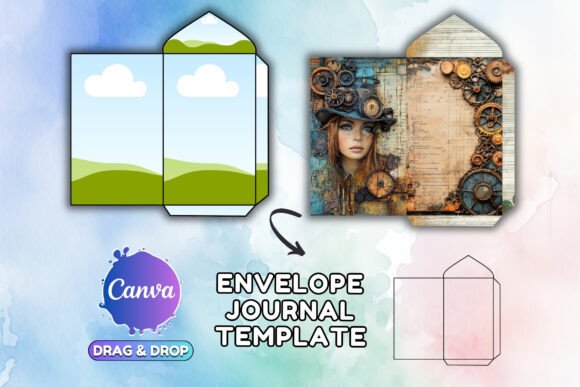
The core appeal of this template is its simplicity. It acts as a digital frame, perfectly sized to the interior dimensions of a standard A7 envelope. Visually, the template structure is clean and unobtrusive. It provides a clear boundary that ensures your custom design doesn't bleed incorrectly or look awkwardly centered. Whether you are using a serif font for a wedding invitation or a sans serif font for a corporate thank you note, the liner serves as the backdrop. The "personality" of this tool is practical and efficient; it removes the technical barrier to entry so that anyone—from a seasoned graphic designer to a hobbyist crafter—can achieve professional results.
Practical Applications: Beyond the Wedding Invite
While weddings are the most common use case, the versatility of a Drag and Drop A7 Envelope Liner Template extends far into commercial and branding territory. If you are a small business owner shipping product cards, a liner is prime real estate for branding. Imagine unboxing an order and pulling out an envelope lined with your brand’s signature pattern or a subtle script font watermark. It reinforces brand identity before the customer even reads the card inside.
For marketers and content creators, direct mail is making a comeback because physical mail stands out in a digital world. Using this template allows you to create high-impact mailers quickly. You can use it to frame a discount code or a QR code, making the interior of the envelope interactive. For bloggers and publishers, sending review copies or subscriber perks with a custom liner adds a layer of perceived value that justifies a premium price point.
- Product Packaging: Use the liner as a backing for delicate items like jewelry or stickers.
- Event Stationery: Coordinate menus, place cards, and envelopes for a cohesive event look.
- Digital Mockups: Create realistic digital representations of your stationery line for your online store without needing a physical photo shoot.
Customization and Visual Hierarchy
The true power of this system lies in the "drag and drop" functionality within Canva. You are not locked into a specific typeface or color scheme. The template acts as a container for your creativity. You can drop in a high-resolution texture, a geometric pattern, or even a photo.
However, design principles still apply. If your envelope is dark, a light-colored liner creates contrast and ensures the address is readable. If you are designing for a luxury brand, consider using a premium font paired with a gold foil texture inside the liner to suggest opulence. The template ensures that no matter how wild the background pattern is, the cut lines remain visible, preserving the structural integrity of the design.
Consider the visual hierarchy. The liner is a supporting actor, not the lead. If you are using a busy, floral background, you might want to add a semi-transparent white shape in the center of the liner to let the recipient's name pop, or simply let the texture speak for itself. The ease of the template means you can test multiple variations—perhaps a handwritten font style for a personal touch or a bold display font for a corporate launch—in minutes.
Maximizing Your Design Assets
When incorporating the Drag and Drop A7 Envelope Liner Template into your workflow, think of it as one part of your broader design assets library. Consistency is key in professional publishing and branding. If you use a specific style for your social media graphics, try to translate that visual language into your physical mailers. The template makes this translation easy because it accepts standard image files.
From a production standpoint, this tool saves money. Instead of buying pre-printed liners in bulk (which risks being stuck with outdated inventory), you print exactly what you need, when you need it. This is ideal for entrepreneurs testing new product lines or crafters who want variety without waste.
Ultimately, this editable frame template bridges the gap between digital convenience and tangible quality. It empowers you to treat the envelope not as a disposable wrapper, but as the opening chapter of the story you are telling your audience. Whether you are crafting a personal invitation or a global marketing campaign, the ability to control every millimeter of that first impression is invaluable.