Unlocking Creativity with Specimen Slide Templates
There is a specific kind of joy in the tangible artifacts of the natural world—vintage specimen slides, botanical illustrations, and preserved memories. Translating that tactile, scientific aesthetic into modern digital design often feels difficult. You want the charm of vintage collage without the hassle of scanning, cutting, and masking in complex software. This is where the CANVA FRAME TEMPLATE / Specimen Slides 2 enters the conversation, offering a bridge between high-end design capabilities and user-friendly accessibility.
As a designer or content creator, you understand that the tools you choose dictate the speed and quality of your output. This template set isn't just a collection of shapes; it is a curated design asset engineered for Canva’s environment. It respects the user's time while delivering a level of sophistication that elevates standard social media posts into cohesive visual narratives. Whether you are building a brand identity for a boutique apothecary or crafting digital journaling pages, understanding how to leverage these frames is essential.
The Anatomy of the Template: Visuals and Versatility
Visually, the CANVA FRAME TEMPLATE / Specimen Slides 2 embraces a distinct retro-scientific personality. It evokes the feeling of a curator’s desk—organized, intricate, and full of history. The style relies on clean lines that mimic the glass and brass of traditional microscope slides, providing a structured boundary for your imagery. This structure is its greatest strength. It forces a discipline in layout that often leads to more compelling compositions.
Unlike a standard square crop, these frames offer a unique visual hierarchy. They allow you to layer textures, photography, and typography in a way that feels organic. The "personality" of the template is adaptable; it can feel moody and Victorian with dark backgrounds and serif fonts, or it can feel modern and eclectic with bright colors and sans serif pairings. This versatility makes it a premium font-like asset in your toolkit—it adapts to the voice you give it.
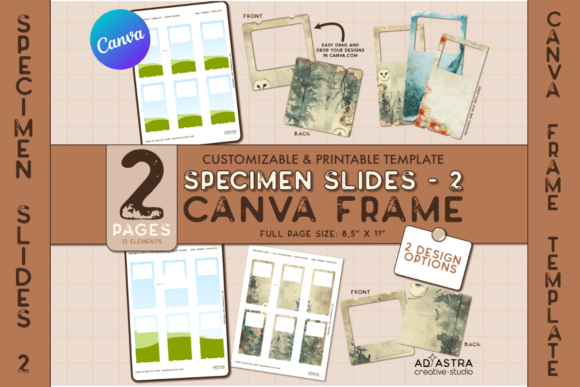
What makes this specific kit practical is the inclusion of two distinct creative options. You can apply a single, cohesive design across the entire sheet for a uniform look, or you can tailor individual items with unique designs for variety. This flexibility is crucial for anyone managing a content calendar who needs both consistency and novelty.
Strategic Applications: From Branding to Digital Journaling
Where does a template like this actually work best? The applications span far beyond simple scrapbooking. For entrepreneurs and small business owners, the CANVA FRAME TEMPLATE / Specimen Slides 2 serves as a powerful tool for packaging design concepts and social media graphics.
Imagine a skincare brand wanting to highlight natural ingredients. Using these frames, you can create a series of Instagram posts featuring botanical extracts that look like preserved scientific samples. This builds a brand identity rooted in nature and precision. Similarly, in editorial design, these frames are excellent for breaking up text-heavy layouts in digital magazines or blog headers, adding a layer of visual interest that keeps the reader engaged.
For the hobbyist and digital planner community, the utility is just as high. The templates function as perfect "mats" for photos or digital stickers. Because they are designed as Canva Frames, the masking process is instant. You simply drag your image into the frame, and Canva handles the clipping mask. This eliminates the technical barrier that usually prevents hobbyists from achieving professional-looking journal pages.
Technical Execution and Design Workflow
One of the most significant hurdles in design is the "cold start"—staring at a blank canvas. The CANVA FRAME TEMPLATE / Specimen Slides 2 solves this by providing a structural foundation. However, to truly maximize its potential, you need to approach it with a strategy regarding typography and color.
Because the frames themselves are intricate, your choice of typography matters. A highly decorative script font or handwritten font might clash with the detailed edges of the frames. Instead, consider using a clean sans serif font for body text to ensure readability, paired with a bold display font or serif font for headers to maintain that vintage authority. This font pairing strategy ensures that the visual hierarchy remains clear, and the text doesn't compete with the imagery inside the frames.
Furthermore, consider the "white space" around the frames. In web design and print, the negative space is just as important as the content. Do not feel the need to fill every corner of the slide with an image. Leaving some frames partially filled or using solid color blocks can create a rhythm in your layout that guides the viewer's eye naturally across the page.
Practical Guide to Implementation
Getting started with the CANVA FRAME TEMPLATE / Specimen Slides 2 is designed to be frictionless, but there are professional nuances to consider to ensure your final product is polished.
- Image Selection and Resolution: Because these templates mimic physical objects, the quality of the photos you place inside them is paramount. Grainy or low-resolution images will break the illusion of a "specimen." Use high-contrast photography—close-ups of textures, plants, or abstract patterns work best to mimic the look of slides under a lens.
- Color Theory and Mood: Use the template to dictate your color palette. If you are going for a vintage look, desaturate your images slightly and apply a warm, sepia-toned filter before placing them into the frames. For a modern twist, use high-contrast black and white images against a stark white background.
- Licensing and Usage: Always review the commercial licensing included with your purchase. Most high-quality template sets allow for commercial use in end-products (like selling printed journals or using graphics for a client's social media), but you cannot resell the template file itself. This ensures you can use these assets for logo design mockups or client presentations without legal friction.
- Export Settings: When exporting for print design, ensure you download the file as a PDF Print to retain the sharpness of the frame edges. For digital use, PNG is usually preferred for transparency, but JPG is sufficient for standard social media uploads where file size is a concern.
Elevating Your Creative Output
The difference between amateur and professional design often lies in the details—the consistency of the borders, the sharpness of the masking, and the cohesion of the visual theme. The CANVA FRAME TEMPLATE / Specimen Slides 2 provides these details pre-packaged. It allows you to focus on the creative aspect—curating the images and writing the copy—rather than getting bogged down in the technical construction of the layout.
By integrating these frames into your workflow, you are not just using a design asset; you are adopting a visual language. It signals to your audience that you value aesthetics, detail, and a touch of nostalgia. Whether you are designing a menu for a cafe, a lookbook for a fashion line, or a set of planner stickers for a digital shop, these templates provide the canvas upon which your unique vision can thrive.